
Instagram Grid Size 2025: What Changed and How to Adapt
Practical guide to the 2025 Instagram grid update. Learn the 4:5 upload vs 3:4 display behavior and how to build seamless profile grids.
Table of Contents
🚀 Instagram Grid Size 2025 Key Points
If you're searching for "did instagram change grid size" or "what is the new instagram grid size", here are all the answers you need:
- •Instagram grid size change: 4:5 uploads with a 3:4 profile display
- •New Instagram grid size 2025: Two display modes appear in testing
- •Instagram profile grid size: Core display area is 3:4 ratio
- •Adaptation formula: 3:4 content + white padding = seamless grid
📱 Did Instagram Change Grid Size? 2025 Major Update Analysis
Instagram changed its grid behavior in early 2025: uploads are 4:5, while the profile grid displays the 3:4 center. Even months later, many creators are still adapting. Understanding the upload-versus-display logic is the key to keeping grids clean and aligned.
⚠️ Important Reminder:Although Instagram head Adam Mosseri stated in a Threads post that "Instagram now supports 3:4 aspect ratio photos - the format that almost every phone camera defaults to," the reality may not be so simple.
🔍 What Size is the New Instagram Grid? Technical Analysis
Based on testing, the current Instagram profile grid behavior may differ by device or region. This variation is the main reason creators see inconsistent results.
Want to turn these numbers into real layouts? Read the Instagram grid layout guide.
🎯 Instagram Update Grid Size: In-Depth Analysis of Two Display Modes
📐 Mode 1: 4:5 Upload → 3:4 Display
When you upload images at 4:5, Instagram crops them to show the 3:4 center on the profile grid.
- Upload size: 1080×1350px (4:5)
- Display size: 810×1080px (3:4)
- Crop method: Equal cropping from all sides
Note: This doesn't mean uploading 3:4 images is correct, because Instagram will still scale your image to fill the 4:5 grid, then crop it to display the 3:4 portion.
📐 Mode 2: Direct 3:4 Support (Some Regions)
In some regions, tests suggest 3:4 uploads are accepted. Instagram head Adam Mosseri said Instagram now supports 3:4 aspect ratio photos, but actual behavior can vary.
- Upload size: 1080×1440px (3:4)
- Display size: 990×1440px (45 pixels cropped from each side)
- Crop method: Mostly left and right cropping (observed)
| Display Mode | Upload Size | Final Display | Crop Method | Applicable Regions |
|---|---|---|---|---|
| Mode 1 | 1080×1350 (4:5) | 810×1080 (3:4) | Equal cropping from all sides | Most regions |
| Mode 2 | 1080×1440 (3:4) | 990×1440 | 45px from each side (observed) | Some regions (observed) |
Ready to design the layout that fits each mode? Open the Instagram layout planning guide.
✨ Practical Solutions: Adapting to the 2025 Instagram Grid Update
For the two observed display modes, here are practical solutions:
🎨 Method 1: White Canvas Method (Recommended)
- 1. Crop image: Crop your image to 3:4 ratio (e.g., 810×1080px)
- 2. Create canvas: Create a 1080×1350 white canvas in Photoshop/Canva
- 3. Center placement: Place the cropped 810×1080 image centered on the white canvas
- 4. Export and upload: Export the 1080×1350 image and upload to Instagram
✅ Effect: Instagram will crop the white padding around the image, and the profile grid will display the 3:4 core content. For most regions, All-side padding works best; if your account trims only the sides, use Left & right padding in Advanced settings > IG recrop protection.
You can also use our IG Grid Maker tool to skip manual calculations and generate clean, aligned grid exports.
See how IG Grid Maker works step-by-step ->White Canvas Method Step Diagram
1. Original Image
2. Crop to 3:4
3. Place in White Canvas
4. Instagram Display
🎨 Method 2: Direct 3:4 Adaptation (Experimental)
- 1. Crop image: Crop your image to 3:4 ratio (e.g., 810×1080px)
- 2. Create canvas: Create a 900×1080 white canvas in Photoshop/Canva
- 3. Center placement: Place the cropped 810×1080 image centered on the white canvas
- 4. Export and upload: Export the 900×1080 image and upload to Instagram
🧮 Instagram Profile Grid Size Calculation Formulas
After mastering the basics of the 2025 Instagram grid update, let's look at precise calculation methods for different grid layouts:
Grid Size Calculation Formula Diagram
📐 1×3 Grid Calculation
Original Size (9:4)
1080
1080
1080
📐 2×3 Grid Calculation
Original Size
1080
1080
1080
1080
1080
1080
📐 3×3 Grid Calculation
Original Size
1080
1080
1080
1080
1080
1080
1080
1080
1080
📐 1×3 Grid (Panoramic Layout)
- Original crop size: 2430×1080px (9:4 ratio)
- Single piece after splitting: 810×1080px (3:4 ratio)
- Final canvas: 1080×1350px × 3 images
- Use cases: Landscapes, product displays, brand stories
📐 2×3 Grid (Story Sequence)
- Original crop size: 2430×2160px
- Single piece after splitting: 810×1080px × 6 pieces
- Arrangement: 2 rows, 3 columns
- Use cases: Tutorial steps, product details, timeline displays
📐 3×3 Grid (Classic Puzzle)
- Original crop size: 2430×3240px
- Single piece after splitting: 810×1080px × 9 pieces
- Arrangement: 3 rows, 3 columns
- Use cases: Large posters, artwork, brand promotions
📸 Real Cases: Instagram Grid Size Change Practical Results
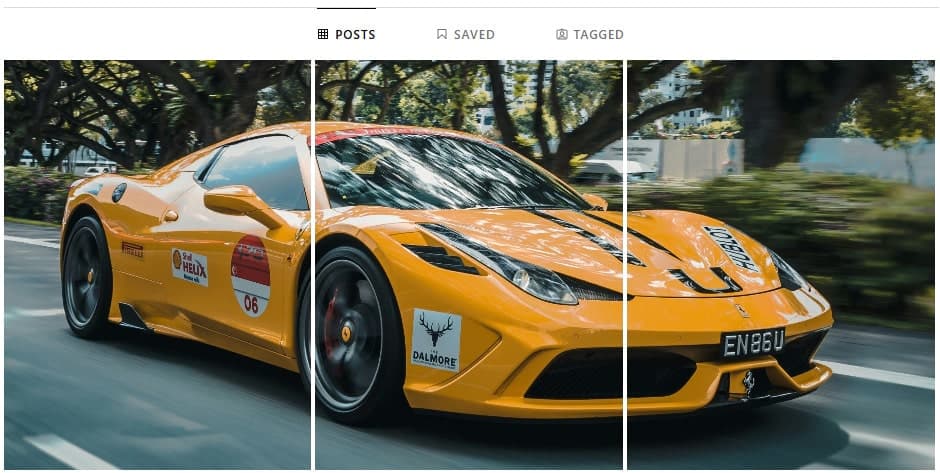
🚗 Case 1: Car Brand 1×3 Panoramic Display
- Original image: 2720×2040px car photography
- Crop processing: 2430×1080px (maintaining 9:4 ratio)
- Grid splitting: 3 pieces of 810×1080px each
- Final result: Perfect seamless car panoramic display
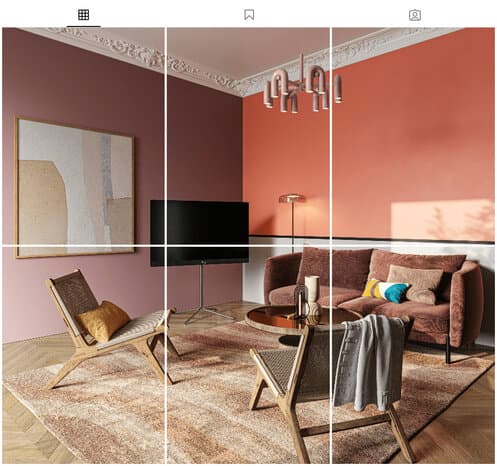
🏠 Case 2: Interior Design 2×3 Story Display
- Original image: 5000×5000px interior design image
- Crop processing: 2430×2160px
- Grid splitting: 6 pieces of 810×1080px each
- Final result: Complete interior design story display
🏖️ Case 3: Beach Portrait Photography 3×3 Puzzle
- Original image: 3072×4096px beach portrait photography
- Crop processing: 2430×3240px
- Grid splitting: 9 pieces of 810×1080px each
- Final result: Stunning large-scale portrait photography display

🛠️ Tools and Resources: Easily Handle Instagram Update Grid Size
🎯 Recommended Tools
🚀 IG Grid Maker (Top Recommendation)
Professional tool designed specifically for Instagram grid size 2025, supporting:
- ✅ Automatic calculation of optimal crop sizes
- ✅ One-click white canvas generation
- ✅ Support for multiple grid layouts
- ✅ Real-time preview effects
- ✅ Batch processing functionality
🎨 Manual Creation Tools
- Photoshop: Professional-grade image processing
- Canva: Simple and easy-to-use online design
- Figma: Collaborative design platform
- GIMP: Free open-source image editor
❓ Frequently Asked Questions
A: Instagram changed its grid behavior in 2025: uploads are 4:5, while the profile grid displays the 3:4 center. Upload size is 1080×1350px, core display area is 810×1080px.
Need inspiration? Review the Instagram profile grid layout guide.A: While possible, the current 4:5/3:4 system appears relatively stable. Creators should focus on building flexible workflows rather than rigid processes.
A: This is usually because white padding wasn't used. Even when uploading correctly proportioned images, Instagram still performs edge cropping. Using the white canvas method with the right padding mode solves this problem in most cases.
See the perfect solution steps above.A: Based on our observations, there may be slight differences between regions. Most regions use the 4:5 upload/3:4 display mode, while some regions support direct 3:4 upload. We recommend using the first method to ensure compatibility.
A: No, Instagram Stories use a 9:16 vertical ratio, completely different from grid display. This guide is specifically for profile grid display.
🎯 Start Creating Perfect Instagram Grids
Now that you've covered the key points of the 2025 Instagram grid update, it's time to start creating amazing grid content!