How to Create an Instagram Profile Grid Layout (2025 Guide)
Learn how to design Instagram profile grid layouts that attract followers. This guide covers five layout styles, planning strategies, and practical tips for cohesive feeds.
Table of Contents
What is Instagram Profile Grid Layout?
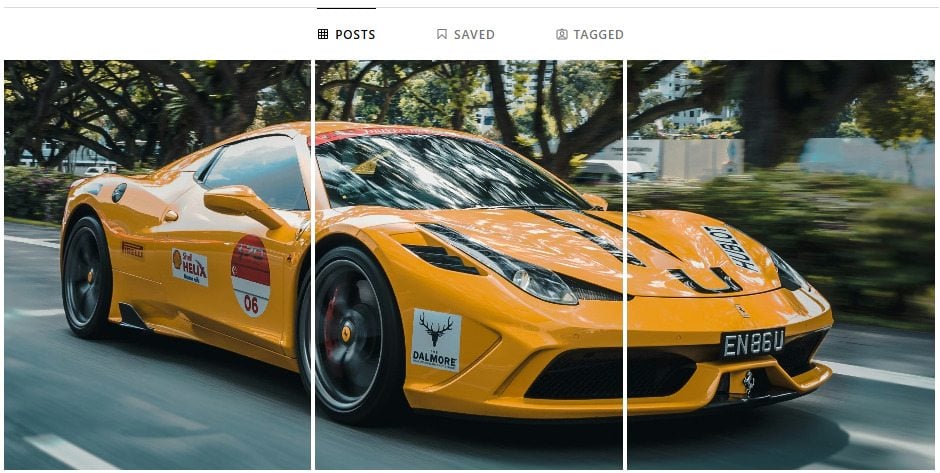
An Instagram profile grid layout is the visual arrangement of posts on your profile that work together to create a cohesive look. When people visit your profile, they see a three-column grid of your most recent 9, 12, or more posts - it's your first impression.
Why Grid Layouts Matter on Instagram
The power of first impressions on social media
First Impressions Drive Follows
Many users decide quickly whether to follow after scanning the profile grid. A well-designed layout communicates your brand style, showcases content quality, and can improve follow conversion.
Enhanced Brand Recognition
Consistent grids build visual brand identity through color, photography style, and repeatable design cues that make your profile memorable.
Increased User Engagement
Strong grid layouts encourage people to browse more content, increase likes and comments, and improve overall reach.
Need the latest Instagram grid dimensions? Read the 2025 grid size update guide.
Essential Principles for Instagram Grid Design
Color Harmony Principle
Choose 2-4 main colors and keep posts within that palette:
Monochromatic scheme: Use different shades of one color
Complementary scheme: Use opposite colors on the color wheel
Analogous scheme: Use adjacent colors on the color wheel
Content Balance Principle
Balance content types across your grid:
70% core content: Directly related to your niche
20% personal content: Show your human side
10% promotional content: Product or service promos
Visual Rhythm Principle
Create visual rhythm by avoiding similar posts back-to-back, adding breathing room between dense posts, and mixing composition styles.
5 Popular Instagram Grid Layout Styles
Choose the perfect layout style for your brand
Unified Color Layout
All posts use the same color tone and filter
Suitable for:Lifestyle bloggers, brand accounts
Difficulty:Medium
Tips:Use consistent filters and keep color harmony across posts
Row-by-Row Layout
Each row of three posts shares the same theme or style
Suitable for:Travel bloggers, photographers
Difficulty:Easy
Tips:Plan a theme for each row in advance
Column Layout
Each column uses different colors or themes to group content
Suitable for:Educational content creators, multi-topic creators
Difficulty:Medium
Tips:Assign content types to each column
Puzzle Layout
Multiple posts combine to form one large image
Suitable for:Product launches, special promotions
Difficulty:Easy
Tips:Use IG Grid Maker to create puzzle effects quickly
Checkerboard Layout
Two templates alternate to create a checkerboard effect
Suitable for:Multi-theme content creators
Difficulty:Medium
Tips:Keep balance between the two styles
Step-by-Step Guide to Creating Your Grid Layout
From planning to execution - a complete workflow
Step 1: Define Your Brand Style
Start by defining your target audience (age range, interests) and the visual styles they respond to. Choose 1-2 main colors, 1-2 accent colors, and neutral tones like white, gray, and black.
Step 2: Plan Your Grid Layout
Use grid planning tools to visualize your layout. Visit IG Grid Maker for free grid tools. Build a content calendar 2-4 weeks ahead to keep the grid coherent while leaving room for timely posts.
Follow the 2025 grid size checklist ->Step 3: Prepare and Edit Content
For photography, keep lighting consistent, use similar angles, and watch background clutter. For editing, use the same presets and keep brightness, contrast, and saturation consistent.
Step 4: Publish and Maintain
Follow your planned posting order, keep a steady cadence, and monitor how the grid looks. Review performance regularly, adjust based on feedback, and evolve your style gradually.
Grid Layout Tool Selection Guide
Choose the right tools for efficient creation
Key Selection Criteria
Ease of use: Clean interface, intuitive controls
Feature coverage: Support for multiple grid sizes and formats
Output quality: Preserve image quality
Cost: Free or high-value options
Online Tools (Recommended)
✅ No download required; use anytime
💡 IG Grid Maker - free to use, no watermarks
❌ Requires internet connection
Mobile Apps
✅ Edit anywhere
❌ Limited functionality, some features require payment
Desktop Software
✅ Powerful features, professional-grade editing
❌ Steep learning curve, often paid
Both buttons take you to the tool so you can start right away.
Common Mistakes and How to Avoid Them
❌ Overplanning Without Flexibility
Problem: Sticking rigidly to a plan and missing timely or trending content
Solution: Reserve about 20% flexible slots, prep a few buffer posts, and review the plan regularly
❌ Ignoring Individual Post Quality
Problem: Focusing on grid aesthetics while individual post quality slips
Solution: Make sure each post stands on its own, balance aesthetics with content quality, and review performance data regularly
❌ Changing Styles Too Often
Problem: Switching styles too often and losing consistency
Solution: Build a long-term visual strategy, make gradual changes, and ask for feedback before big shifts
❌ Ignoring Mobile Experience
Problem: Planning on desktop and ignoring mobile viewing
Solution: Preview on mobile first, consider different screen sizes, and test on a few devices
Grid Layout Maintenance Tips
Build a Content Library
Batch-shoot and edit, organize assets by type, and refresh the library regularly
Use Batch Processing Tools
Batch-edit photos to keep consistency, use presets for new content, and automate repetitive tasks
Regular Review and Adjustment
Review grid performance monthly, analyze feedback and data, and adjust strategies as needed
Keep Experimenting
Track design trends, try new layouts, and balance consistency with experimentation
2025 Instagram Grid Layout Trends
Sustainability Themes
Eco-friendly palettes, natural elements, and sustainable lifestyle content
Minimalism Returns
More white space, cleaner compositions, and less visual noise
Personalized Expression
Unique personal styles, original content, and a focus on authenticity
Enhanced Interactivity
Designs that invite participation, interactive elements across posts, and community building
Start Building Your Instagram Grid
A strong Instagram profile grid comes from clear brand positioning, consistent visual style, high-quality content, ongoing optimization, and the right tools. The best grids do more than look good - they communicate your brand and connect with your audience. Start planning today with tools like IG Grid Maker to work faster and stay consistent.
Next: Master the Instagram grid size changes for 2025.
Start Using IG Grid Maker Now