Instagram grid size 2025 explained
Understand the 4:5 to 3:4 display logic and download-ready dimensions.
See size checklistIG Grid Maker is a free browser-based utility for turning one photo into multiple Instagram-ready tiles while preserving the correct 4:5 upload format.
Processing happens entirely in the browser so your media never leaves the device.
Need more details? Scroll to the tutorial sections and FAQ for step-by-step guidance.
A fast grid maker for Instagram with a built-in anti-recrop algorithm that matches the latest 4:5 Instagram post size. Upload a JPG, PNG, or WebP (up to 20 MB), choose 1x3-4x3 or a custom grid, then download a ZIP or individual slices—100% free, no sign-up.
Supports JPG, PNG, WebP formats up to 20MB and 16K pixels
IG Grid Maker is a dedicated image splitter for Instagram creators, built to be an Instagram grid maker. Its built-in anti-recrop algorithm is tuned for the 2025 post-size update: it renders a 3:4 preview, then calculates safe padding for each slice so Instagram's second crop trims only the padding, not your content. Use it to build a profile grid or carousel covers with quick presets (1x3-4x3) or custom layouts (1x1-6x6), plus puzzle and slice previews and ZIP or single-file downloads. Everything runs locally in your browser with no uploads, no sign-up, no software downloads, and no usage limits - 100% free and online, ideal for individuals and teams.
Drag and drop your image or click to select it. JPG/PNG/WebP are supported up to 16K pixels and 20MB; files never leave your browser, and IG Grid Maker simply reads the size locally to render the preview and grid selection frame.
Choose a preset from 1x3 to 4x3 or define custom rows/columns such as 1x1, 5x2, or 4x4. You can also open Advanced Settings to pick All-side padding or Left & right padding (the default covers most regions and devices) to prevent Instagram re-cropping.
After clicking "Create Grid," the tool outputs 4:5 slices along with an Instagram puzzle preview and slice list. Download them as a ZIP or individual files; if you want changes, adjust the layout and regenerate without re-uploading, then publish to Instagram in reverse order.
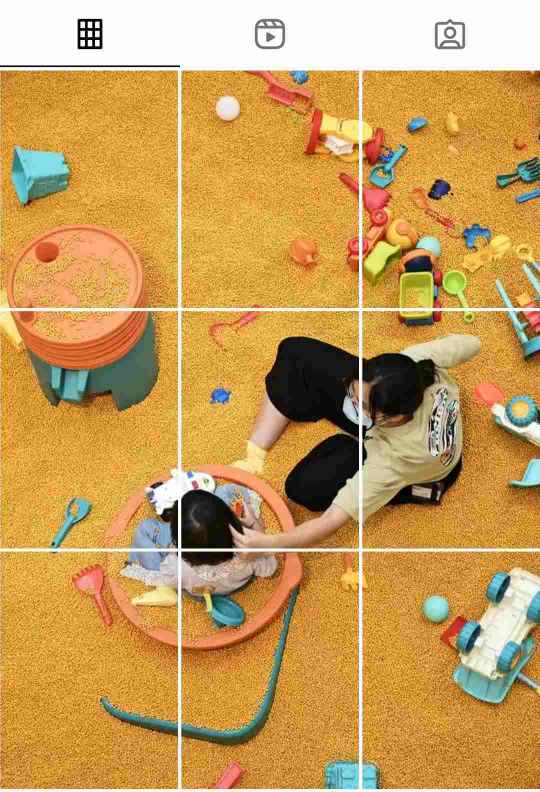
The tool first creates precise 3:4 slices and then calculates per-slice padding to export 4:5 upload-ready files, matching Instagram's 2025 display and upload logic so puzzle feeds and story sequences keep their key elements.
Use quick presets from 1x3 to 4x3 or switch to custom setups such as 1x1, 5x2, or 4x4 with a single tap to match different content plans.
In Advanced Settings > IG recrop protection, pick All-side padding or Left & right padding. The default covers most regions/devices, and you can override it when specific layouts require extra safe zones.
Supports JPG/PNG/WebP up to 16K pixels and 20MB. All calculations and previews happen locally in your browser, so files never leave your device, keeping both speed and privacy intact.
When available, IG Grid Maker automatically uses Web Workers to process large images or multi-slice grids in parallel, avoiding UI freezes and keeping the workflow smooth.
Click "Create Grid" to get 4:5 upload-ready slices, an Instagram puzzle preview, and a slice list with the posting order. Download them as a ZIP or single files, and regenerate without re-uploading if you tweak the layout.
The grid maker for Instagram is free to use with no usage limits, watermarks, hidden fees, registrations, or downloads - everything works right in your browser.
Our changelog tracks every algorithm update so the tool keeps up with the latest Instagram grid size changes (including the 2025 shift to 4:5 uploads), and the blog shares real-world walkthroughs.
With 10+ interface languages and one-click switching, agencies, freelancers, and clients can work together without translation headaches.
We publish privacy policies, terms of service, and support contacts; all images are processed locally in your browser so personal and brand assets never leave your device.
We are continuously compiling guides and FAQs for puzzle posts, UGC stories, profile grid layouts, safe padding workflows, courses, and A/B tests so you can quickly match the right grid plan to each project.
Reach us through the contact page and browse evolving FAQs to troubleshoot technical or workflow issues without delay.
Upload JPG/PNG/WebP at 1080px or higher; crisp sources keep the exported 4:5 slices sharp when they form your Instagram grid.
Cycle through the 1x3–4x3 presets or your own rows/columns and check the live preview before hitting "Create Grid" so you only need to export once.
Drag or resize the grid selection frame so faces, logos, and text stay visible; our Instagram grid maker slices exactly within that boundary.
The default All-side padding covers most scenarios; if Instagram still recrops and distorts the layout, switch to Left & right padding and let us know if it persists.
Use the puzzle preview and slice list to confirm order/content, then upload in reverse sequence so your Instagram grid rebuilds the seamless visual.
Learn how creators adapt to the 2025 Instagram grid before you split your image.
Understand the 4:5 to 3:4 display logic and download-ready dimensions.
See size checklistFull workflow from palette planning to 3x3 alignment.
Read layout guideSelect your Instagram grid layout
Custom grid
Supports JPG, PNG, WebP formats up to 20MB and 16K pixels
Safe padding, layout planning, and up-to-date grid sizes - open any guide below for the full workflow.
Use our free online Instagram grid maker now to easily create perfect Instagram puzzles and 9-tile grid layouts!